How to Add Time for Work Hours and Timesheets
Payroll errors cost real money, every single pay period. Yet most timesheet mistakes trace back to something embarrassingly simple: a forgotten carry or a mistyped decimal. Learning how to add work hours protects your paycheck and your sanity simultaneously. This guide walks through daily shifts, weekly totals, unpaid breaks, and the decimal conversions American payroll systems demand.
Why Accurate Work Time Matters
Federal wage law requires employers to keep accurate records of total hours worked. Every paid minute must appear somewhere. Sloppy arithmetic creates genuine legal liability for businesses.
For workers, the stakes feel far more personal. Ten forgotten minutes each day equals roughly 43 unpaid hours annually. That exceeds a full work week. At $20 hourly, you just handed back $860 without noticing.
How to Add Daily Work Hours
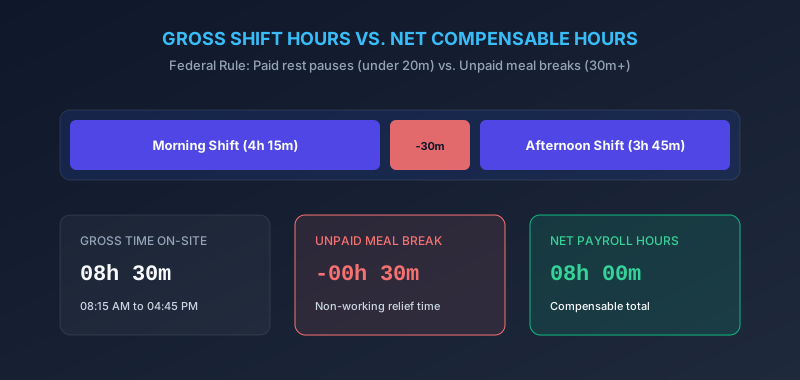
Begin with your clock in and clock out times. Subtract to find raw work duration, then remove any unpaid breaks. A shift running 8:15 AM to 4:45 PM covers 8 hours 30 minutes.
Now subtract a 30 minute unpaid lunch. Your paid timesheet hours land at exactly 8 hours. Repeat this daily and your week practically totals itself. Keep a personal log too, separate from the company system.
How to Total Hours From Multiple Shifts
To add multiple shifts, sum all minutes first and all hours second. Never convert after each individual entry. Batching cuts your work roughly in half while reducing slips.
Split shifts demand extra attention. Morning and evening blocks get calculated separately, then combined into one total work time figure. Servers, nurses, and warehouse staff deal with this constantly.
Adding Breaks to a Work Schedule
Paid breaks count toward hours worked. Unpaid meal periods do not. Under federal guidance, short rest breaks under twenty minutes generally remain paid. Subtract only genuine unpaid meals when you calculate work time, otherwise your hours worked calculator will quietly overstate everything.
How to Calculate Weekly Work Hours
To calculate weekly work hours, total every day in the pay week. Add the minute column completely, then convert one single time at the end.
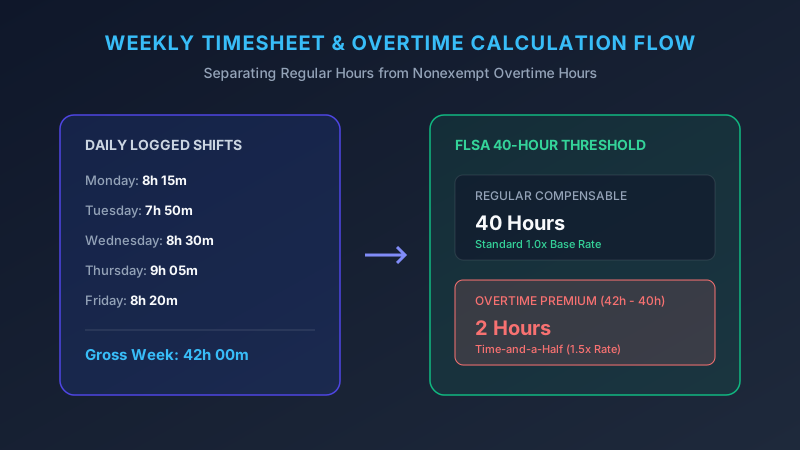
Anything beyond 40 hours triggers overtime for nonexempt employees. Accurate overtime calculation depends entirely on clean addition upstream. One missed carry can erase an hour of premium pay.
| Day | Hours Worked |
|---|---|
| Monday | 8h 15m |
| Tuesday | 7h 50m |
| Wednesday | 8h 30m |
| Thursday | 9h 5m |
| Friday | 8h 20m |
| Total | 42h 0m |
Adding Hours From a Timesheet
Read every row carefully before adding anything. Check AM and PM markers twice, then check again. Night shifts crossing midnight confuse almost everybody at first.
A shift running 10 PM to 6 AM covers eight hours, not four. Mishandle that rollover and your payroll hours calculator produces confident nonsense. Count to midnight, then continue counting into the new day.
Hours and Minutes vs. Decimal Hours
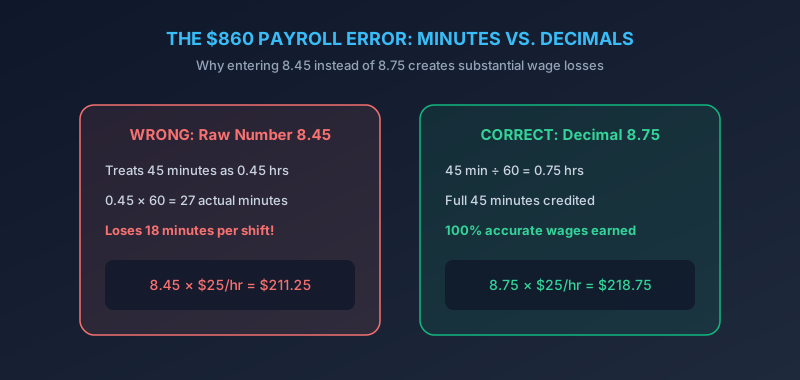
Payroll software wants decimals, not colons. To convert work hours to decimal, divide your minutes by 60. So 8 hours 45 minutes becomes 8.75 hours.
Here lives the most expensive mistake in this entire article. Typing 8.45 instead of 8.75 shortchanges you eighteen minutes. Repeat that weekly and you lose roughly fifteen hours annually. Check this conversion every single time.
| Minutes | Decimal |
|---|---|
| 10 | 0.17 |
| 15 | 0.25 |
| 20 | 0.33 |
| 30 | 0.50 |
| 45 | 0.75 |
| 50 | 0.83 |
Common Timesheet Calculation Errors
The decimal mixup leads every list. Next comes forgetting the minute carry entirely. Third, people mix twelve hour and twenty four hour notation within one sheet.
“Round consistently or do not round at all.”
Inconsistent rounding causes slow, quiet losses. Some employers round to the nearest quarter hour, which is legal when applied evenly. Pick one rule and apply it identically every week.
Using a Time Addition Calculator for Work
An online timesheet calculator removes the grunt work completely. Enter each shift, receive instant totals in both formats. Many tools handle overtime calculation and break deductions automatically.
Still verify your inputs carefully. A time tracking calculator cannot detect a wrong PM entry or a shift you forgot to log. Garbage in, garbage out, exactly as always.
Case Study: Marcus at a Phoenix Warehouse
Marcus worked five shifts one week: 8h 45m, 9h 20m, 7h 55m, 8h 10m, and 9h 30m. His minutes totaled 160, converting neatly into 2 hours 40 minutes. Added to his 41 base hours, he logged 43 hours 40 minutes. That produced 3.67 overtime hours worth roughly $82 in premium pay, money he nearly missed.
Conclusion
You now know how to calculate total work hours without guesswork or anxiety. Sum the minutes, convert once, then verify every AM and PM marker before submitting.
Keep independent records regardless of what your employer tracks. When you calculate hours worked yourself, disputes resolve quickly and politely. Accuracy pays, quite literally, week after week.