What Is a Time Addition Calculator and How Does It Work?
Math with clocks feels strange. Sixty rules everything, not ten. That single quirk turns simple sums into small puzzles, which is exactly why a time addition calculator exists. It handles the carrying for you, instantly and accurately, without the scratch paper. Below, you will learn what is a time addition calculator, what happens inside it, and when reaching for one actually beats doing the math yourself.
What Is a Time Addition Calculator?
A time addition calculator is a simple tool that combines two or more time values into one clean total. You type hours, minutes, and seconds into separate fields. It returns the sum in readable form. No carrying, no borrowing, no second guessing.
Think of it as a calculator that speaks base 60 fluently. Your phone calculator treats 1.30 as a decimal number. This time calculation tool understands that 1:30 means ninety actual minutes. That difference sounds tiny, yet it causes thousands of payroll disputes every year across American workplaces.
How Does a Time Addition Calculator Work?
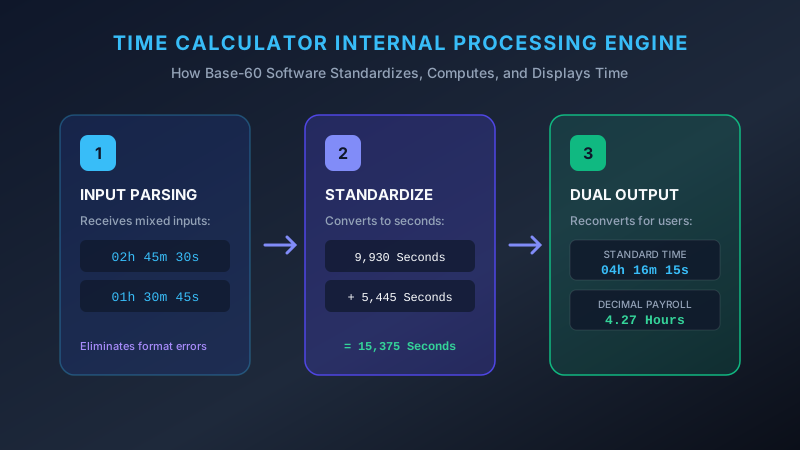
Here is how does a time calculator work beneath the interface. First, the tool converts every entry into a single unit, usually seconds. Then it adds those raw numbers together like ordinary arithmetic. Finally, it converts the total back into hours, minutes, and seconds for display.
That conversion trick removes all human carrying errors permanently. No borrowed hours get forgotten halfway down a list. An online time addition calculator treats entry number fifty exactly like entry number one, which is precisely why it beats scratch paper on long timesheets and project logs.
What Time Units Can You Add?
Most tools accept three time units: hours, minutes, and seconds. Stronger versions also handle days and weeks. You can add hours minutes and seconds together in one entry without normalizing anything first. Mixed units cause no trouble because the time conversion calculator standardizes everything internally before adding.
How Hours and Minutes Are Calculated
The time addition formula stays refreshingly simple. Every minute value gets summed into one raw number. That number then gets divided by 60. The whole number quotient becomes extra hours, while the remainder stays behind as minutes.
For instance, 50 minutes plus 40 minutes equals 90 raw minutes. Divide by 60 and you get one hour with 30 left over. The result reads 1 hour 30 minutes. Clean, fast, and identical every time you repeat it.
How Seconds Are Handled in Time Addition
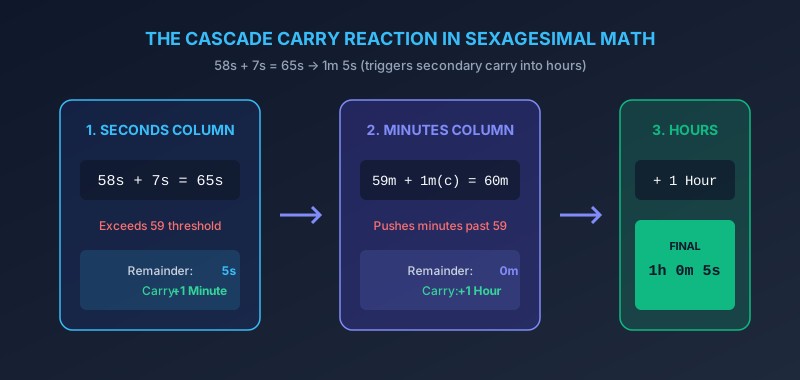
Seconds follow the exact same logic, just one level down. Sixty seconds roll upward into one minute. A good hours minutes seconds calculator cascades that carry automatically without asking you.
Watch the chain reaction closely. Add 58 seconds and 7 seconds and you get 65 seconds, which becomes 1 minute 5 seconds. That freshly carried minute then joins your minute column. Sometimes it pushes the minutes past 60, triggering a second carry into hours.
| Input | Raw Sum | Final Result |
|---|---|---|
| 45s + 30s | 75 seconds | 1 min 15 sec |
| 40m + 35m | 75 minutes | 1 hr 15 min |
| 2h 50m + 1h 20m | 3h 70m | 4 hr 10 min |
| 59m 55s + 10s | 59m 65s | 1 hr 0 min 5 sec |
Understanding the Calculator Result
Quality tools display two outputs side by side. One reads as standard hours and minutes. The other shows decimal hours for payroll software. Learn to understand time calculator results properly before trusting either number.
So 2 hours 45 minutes appears as 2.75 in decimal form. Both numbers describe identical time duration, just written differently. Pick whichever format your spreadsheet or invoice needs. Some calculators add a third line showing total minutes, useful for splitting billable work.
Adding Multiple Time Durations
Need to calculate multiple time intervals in one pass? Most tools offer extra input rows on demand. Keep clicking the add button and your running total updates live.
This matters enormously for freelancers logging scattered tasks. A duration calculator can total fifteen separate entries in seconds. Doing the same by hand invites fatigue, and fatigue invites mistakes. Batch entry also lets you review the whole list before committing to an invoice.
Manual Calculation vs. Online Calculation
Manual math teaches you the underlying logic, and nothing replaces genuine understanding. Still, humans tire, skip carries, and misread their own handwriting after the twentieth row.
“Do it by hand twice, then let software do it forever.”
An add time online tool never gets bored or distracted. It calculates the thousandth entry exactly like the first one, with identical precision.

| Method | Speed | Error Risk | Best For |
|---|---|---|---|
| Manual | Slow | Moderate | Two or three entries |
| Time calculator | Instant | Very low | Long lists, payroll |
Benefits of Using a Time Addition Tool
Speed tops the list obviously. You calculate time instantly rather than scribbling columns and double checking carries. Accuracy follows right behind, especially on entries involving seconds.
Then come the quieter advantages. A time tracking calculator creates records you can attach to invoices or payroll submissions. It helps you calculate time without manual math during genuinely busy shifts. Many tools also export results, which turns a quick calculation into permanent documentation.
Case Study: Daniel’s Freelance Log
Daniel, a Chicago designer, logged eleven client sessions during one busy week. His durations ranged from 25 minutes to 3 hours 40 minutes, with awkward seconds attached. Manual totaling consumed twenty minutes and produced two carrying errors. A time arithmetic calculator returned 31 hours 15 minutes on the first attempt, worth $1,562 billed at his standard rate.
Conclusion
Now you understand how to use a time addition calculator and why it works so reliably. It converts everything down, adds the raw numbers, then converts back upward. Simple mechanics, dependable results.
Learn the manual method anyway, because understanding always beats blind trust. But for daily work, let a time addition calculator carry the arithmetic load. Your attention belongs on the work itself, not on remembering which hour you already borrowed.